AI token research
What /ai actually computes, /lore, /xs, and following X accounts with /xalerts.
A scan card is a read of a chain. It cannot tell you that the same eight accounts have been posting about a token all week, that it was first seen in one group two months ago at $51K, or that four new people looked it up yesterday. These five commands answer that, and they are all reachable from a scan card without typing anything.
| /ai<contract address> | One research card per token: risk, our own scan history, and what X is saying. |
| /lore | The story behind a ticker, in two sentences. |
| /xs<contract | ticker | phrase | @handle> | Every recent X post about a token, with the manipulation tells on top. |
| /xalerts | Follow any X account and get its posts as cards in your chat. |
| /ct | Live crypto Twitter, without opening the app. |
/ai: one research card per token
Tap 🔮 AI under any scan card. The report comes back as a message only you can see, inside the group, with a button to post it publicly if you decide the room should read it. Typed, it takes a contract address.
/ai btc once reached a TRON scam named Bitcoin. Every one of those reads as a confident answer about the wrong asset, which is worse than no answer, so the command refuses tickers rather than guessing.Most of the card is computed, not written. Three of its blocks need no model at all:
- SECURITY is a read of the chain: sellability, tax, whether the contract is verified, holder count, top-10 share.
- CHART is a read of the price: trend, distance from the high, whether volume is rising.
- PROFICY STATS is a read of our own scan history, and it is the block nothing else can produce. When the token was first seen and at what market cap, what it peaked at, how many groups have scanned it, and whether that count is climbing right now.
That last one is the reason the command exists. “First seen 69d ago @ $51.3K, peaked 1006.3x · 5 scans (was 1) · 5 groups · 4 people in 24h ↑” is a query over 71,395,495 commands answered across 105,295 chats since 2022. It is a fact about what thousands of trading groups have been doing, not about the token, and there is no version of it for sale anywhere.
Only the Take, Lore and Watch lines on top are a model, and they run over a live X search rather than over training data. If that call is capped out, times out or fails a freshness check, the rest of the card ships on its own and says the social read was unavailable. Nobody ever sees an error.

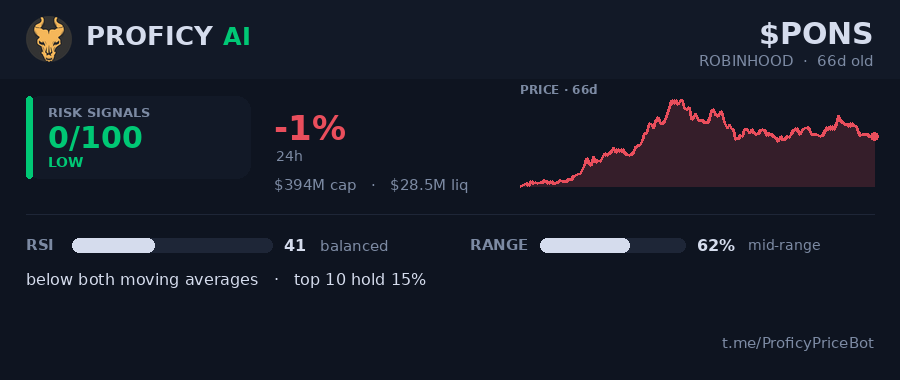
 PROFICY AI · $PONS · ROBINHOODPROFICY STATS /p_7f813c4571
Every button on it opens another view in the same message rather than sending a new one, and the view you are in is marked with a ✅ so one tap gets you to any other. 🧬 Checksum and 🛠 Deployer only appear when that token actually has a record, because a chain being covered is not the same as this token having history on it.
/lore: what is this thing
The smallest command here and the most used thing shipped this quarter. Somebody posts a ticker nobody recognises; rather than four people opening four tabs, one reply answers it. Reply /lore to any scan, or send it with a ticker.
PROFICY LORE · $PONS · ROBINHOODIt reads the project’s own site, its X profile and its posts, adds the latest thing the project announced, and the card says where it all came from in as many words. That line is not boilerplate: knowing what a project claims to be is genuinely useful and genuinely not the same thing as knowing it is true, and a summary that hid the difference would be worse than no summary. The same text appears as the Lore line inside the /ai card.
/xs: X Search, and the posts themselves
Every other product that reads X turns it into one sentiment number, and a number cannot be checked. /xs leads with the tells and then shows you the posts, so you can judge them yourself.
- How many posts, from how many separate accounts, with how many views, and how old the oldest one is. Ten thousand views from four accounts is a different object from ten thousand from four hundred.
- How many posts are repeats from the same handful of accounts.
- How many accounts are running word-for-word identical copy, which is the clearest single tell there is.
Four views sit under the card: overview, top by reach, newest, and a breakdown by account. It takes a contract, a ticker, a phrase or a handle. Every full scan card carries a 𝕏 line for that exact token, and tapping 𝕏 or the post count on it opens this.
- 1. @EdwardTWinz · 1w · ♥2K 👁542KI’m back and ready to run it up again. 💰 $5 to $1M starts NOW 🧠 The next $pons, the next $ai, the next $ZCAT – I’m coming for YOU! Want to…
- 2. @DannyCrypt · 11h · ♥948 👁106KMade over $161K off $PAID, sold it all today. $119 → $161K (1352x for me) ALL YOU HAD TO DO WAS LISTEN TO THE FIRST CALLOUT.. I begged you…
- 3. @whalebelfort · 4d · ♥1.12K 👁63.2KThis is definitely something to watch if you missed $PONS. Community now equals ownership 👀 BULLISH.
/xalerts: follow any account
Any account. Not a menu of the ones we happen to be tracking already: give it a handle and it starts watching. Up to 25 accounts per group and five in a DM, and DMs are supported, which most alert products skip.
The part that is not an RSS feed: when a followed account posts a contract address, the alert is not a repost, it is a scan result. It carries the same chart, terminal and trading-bot rows a scan card does, so the token somebody just called on X is one tap from tradeable instead of three.
Polling runs on its own pool of accounts and proxies, entirely separate from the infrastructure scanning depends on, so a busy alert schedule can never slow down a /p.
/ct
Crypto Twitter as a feed, without a token attached and without opening the app.